OpenAI’s ChatGPT chatbot and Codex coding agents have had access to memories, the company’s term for context (background information) derived from previous chat activity, since April 2024. A new Computer History feature builds on that to include (if you opt in) logging your interactions with websites and applications, so it can essentially follow your footsteps to extrapolate where you want to go.
The feature launched this week on MacOS for subscribers to its Pro, Business and Enterprise plans (but not yet for users in the European Economic Area, Switzerland or the United Kingdom). According to the documentation, admins for the latter two plans can control whether users have the ability to enable the feature, in addition to individual user opt-in.
Beyond having the ability to opt in, you can independently select which applications and websites are fair game, as well as pause tracking; you can also view or delete the history at will.
If Computer History sounds familiar, it’s because integrating your every on-device activity in the service of ultrapersonalized agenting is one of the foundations of every whizzy AI feature trotted out to sell tech in recent years. Notably, it hearkens back to Windows Recall, which Microsoft announced in May 2024 — and then quickly rolled back because of controversy over its security and privacy flaws. About a year later, a refined version began to appear in the operating system.
Unlike Recall and OpenAI’s Chronicle preview, which Computer History replaces, this particular implementation doesn’t capture screens, record voice input or use other similar types of monitoring. Instead, it uses accessibility application programming interface in MacOS to capture everything that API exposes: “clicks, typing, keyboard shortcuts, app switches, and context,” according to the company’s description.
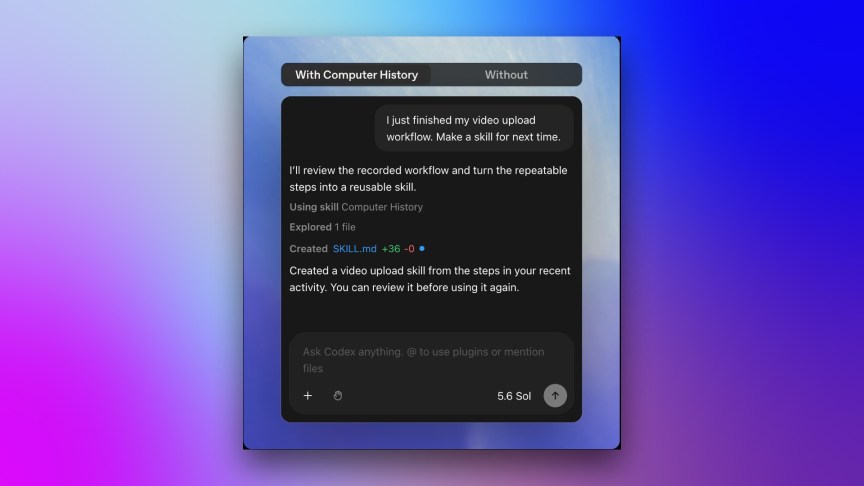
It then periodically synthesizes that activity into a summary of what you’ve done rather than what you saw, heard or said. So, as far as I can tell, it can track and show you where to find files you looked at but not the content of the files. However, if you use that content as part of a future chat, it can link your activity to that content.
Even if only a series of keyboard events gets recorded, that doesn’t necessarily mean the content can’t be inferred or exploited. These types of features fall into my privacy-slash-security complacency zone, where browser fingerprinting, deanonymization and similar schemes dwell.
The summaries are generated in the cloud but stored locally on your system. The company says it doesn’t retain the activity files unless legally mandated and doesn’t use them for training.
OpenAI does issue an explicit warning about the feature in its description: “Computer History files can contain sensitive information. They are not encrypted by Computer History, and other programs running as your macOS user may be able to access them.” The built-in disk encryption on MacOS probably offers a layer of protection in some cases, though.
The feature creates tokens for summarizing and memory creation, so your plan’s token budget and context window size may have an impact.
There’s no indication at the moment when or if a Windows or mobile app will be available.